Studio and the animated stage
Qontent Tube 0.2 adds a stage: every script becomes an animated 1920 × 1080 video whose timing follows the voice. Studio is the start page. Pick a project and a script, then switch between three views that share your draft and the playhead.
| View | What you see |
|---|---|
| Script | The Markdown editor and the scene and speaker outline. |
| Script + Stage | The editor beside the live stage, plus a timeline with scene, voice, animation, and caption tracks. |
| Storyboard | Every scene with wireframes, its elements, and review controls. See Storyboards. |
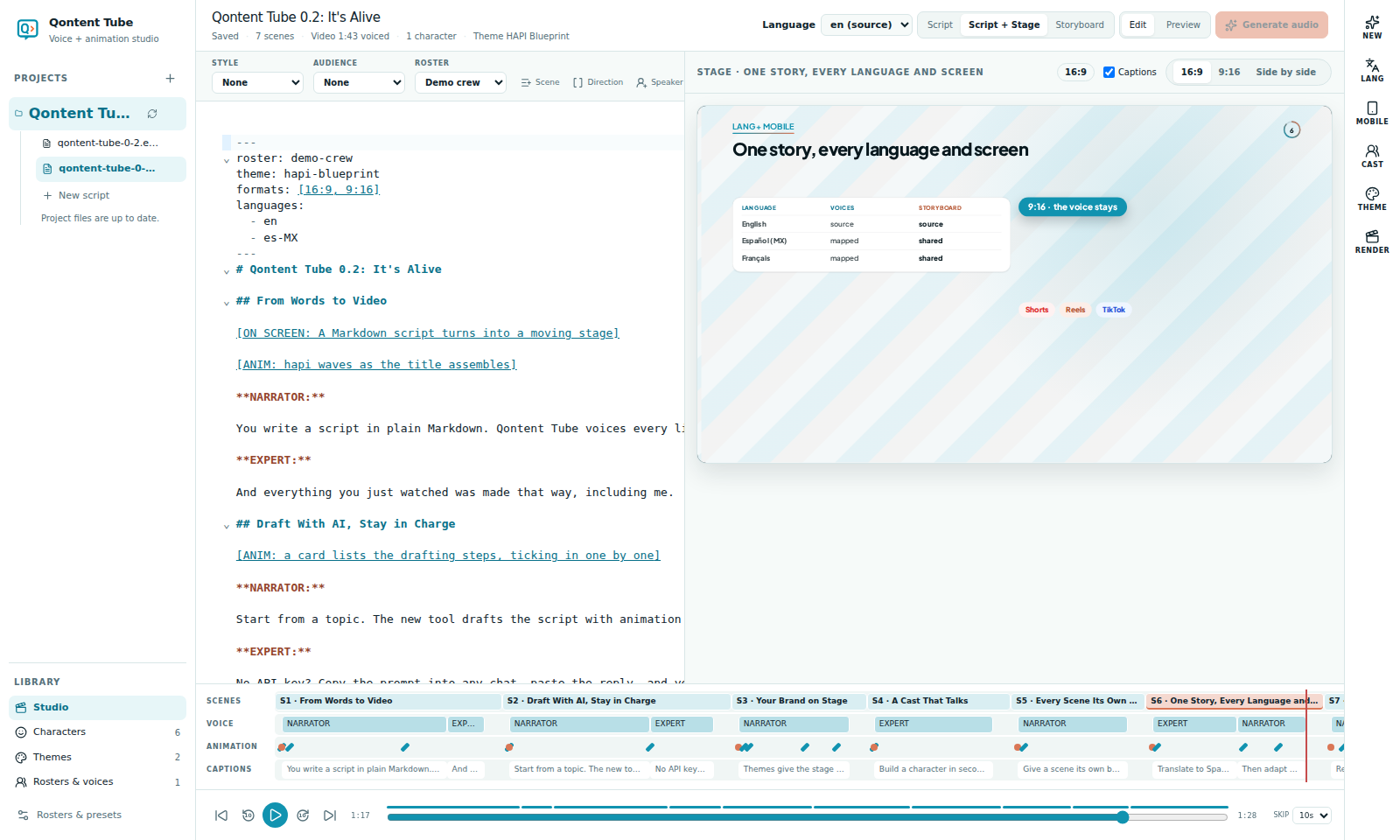
The stage follows the voice
Animation beats are anchored to dialogue lines, not to seconds. When a clip is regenerated or a sentence changes length, every card, chip, and character that belongs to that line moves with it. Until a line has voice, Qontent Tube estimates its length from the words, and the header shows the video length as estimated or voiced.
- Preview with estimated timing plays the stage on its own clock before any audio exists.
- Click a scene, a voice block, or an animation beat on the timeline to jump there.
- The stage header switches between 16:9, 9:16, and side by side (see Mobile formats).
- The Language switch in the script header opens the same video in another language (see Languages).
The tools dock
On the right edge of Studio:
| Tool | Purpose |
|---|---|
| NEW | Draft a new script and storyboard from a topic. AI drafting |
| LANG | Translate, re-voice, and keep languages in sync. Languages |
| MOBILE | Adapt scenes for Shorts, Reels, and TikTok. Mobile formats |
| CAST | Give every speaker a character. Characters |
| THEME | Apply a theme to the script, project, or everywhere. Themes |
| RENDER | Export MP4, captions, chapters, and parts. Rendering |
New script grammar
Two additions to the script grammar:
[ANIM: …]lines describe animation intent. They are never spoken; they appear on the timeline's animation track and guide AI drafting.- Front matter keys
theme,formats(16:9,9:16), andlanguagesrecord production choices.
---
roster: explainers
theme: hapi-blueprint
formats: [16:9, 9:16]
languages: [en, es-MX]
---

# Why Contracts Matter

## The Silent Break

[ANIM: hapi looks worried as error chips pile up]

**NARRATOR:**

One renamed field broke checkout.