AI drafting
AI helps you start; you stay in charge. Every AI result in Qontent Tube is a draft that is validated, reviewable, and never overwrites your work.
Draft a new video
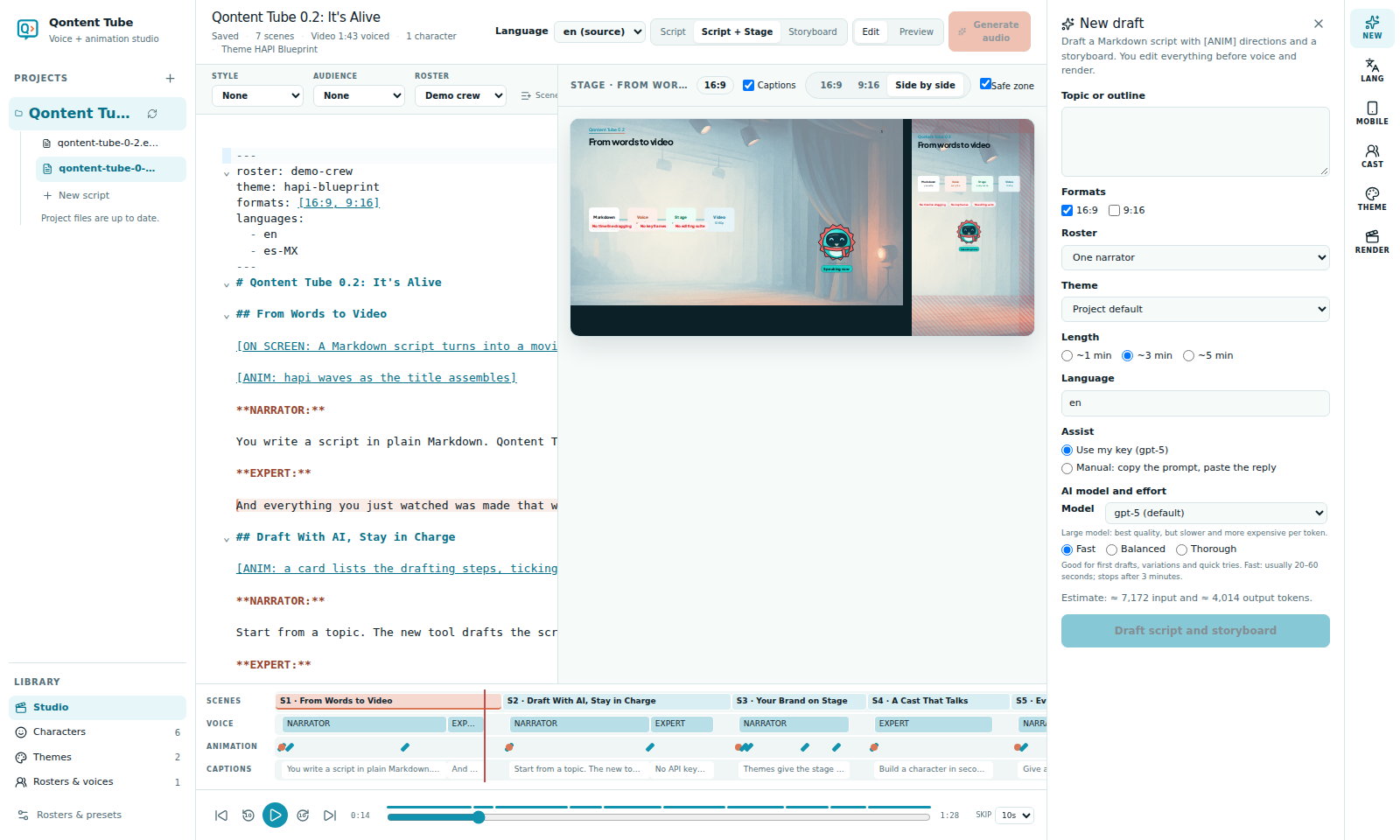
Open NEW in the tools dock and describe the video:
- Topic or outline, formats (16:9, 9:16), roster, theme, length (~1, ~3, or ~5 minutes), and language.
- Qontent Tube drafts a script with scenes, speaker cues, and
[ANIM]directions, then a storyboard for every scene. - The draft is a new file marked as a draft. Existing files are never overwritten.
Review the script and storyboard, then choose Accept draft. Qontent Tube then asks whether to start voice generation now; nothing is generated unless you say so.
Storyboards from an existing script
In the Storyboard view, Generate creates elements for every scene from its dialogue and [ANIM] directions. Regenerate scene replaces one scene. Approved and locked content is kept.
Connect a provider, or use manual mode
Settings → AI assist connects Anthropic Claude or OpenAI with your own key. Choose OpenAI and set an API base URL to use an OpenAI-compatible server such as Ollama. The key stays on your computer and is never shown in the browser again.
Manual mode needs no key: Qontent Tube shows the exact prompt, you paste it into any chat product, and paste the reply back. Replies go through the same checks.
An Anthropic API key is different from a Claude subscription or Claude Code login. Qontent Tube does not sign into Claude Code directly; use Claude Code through manual mode. Provider accounts, usage limits, and charges are separate from the Qontent Tube download. See the requirements and provider options.
Model and effort
When you use a key, choose the model and the effort for each request:
| Effort | Typical wait | Good for |
|---|---|---|
| Fast | 20–60 seconds | First drafts, variations, quick tries |
| Balanced | 1–2 minutes | More careful structure, fewer repairs |
| Thorough | 2–5 minutes | Long scripts and tricky refinements (more tokens) |
The note under the model explains what to expect: small models are fastest and cheapest, large models give the best quality at a higher cost. While a request runs you see the elapsed time and can Cancel at any time.
Always valid
Replies must match the storyboard schema and the script: anchors in the right scene, known characters, unique IDs, the right speakers, meaningful scene titles, and the requested length. A reply that fails gets one automatic repair attempt; then you see exactly what was wrong.
Provenance and privacy
Every AI run is recorded with the storyboard (provider, model, template version, and token usage) and shown under AI provenance. What is sent: your brief, or the selected scenes' titles, directions, and dialogue, plus the theme name and cast. Never sent: audio, other scripts, or your keys.