Write scripts in Markdown
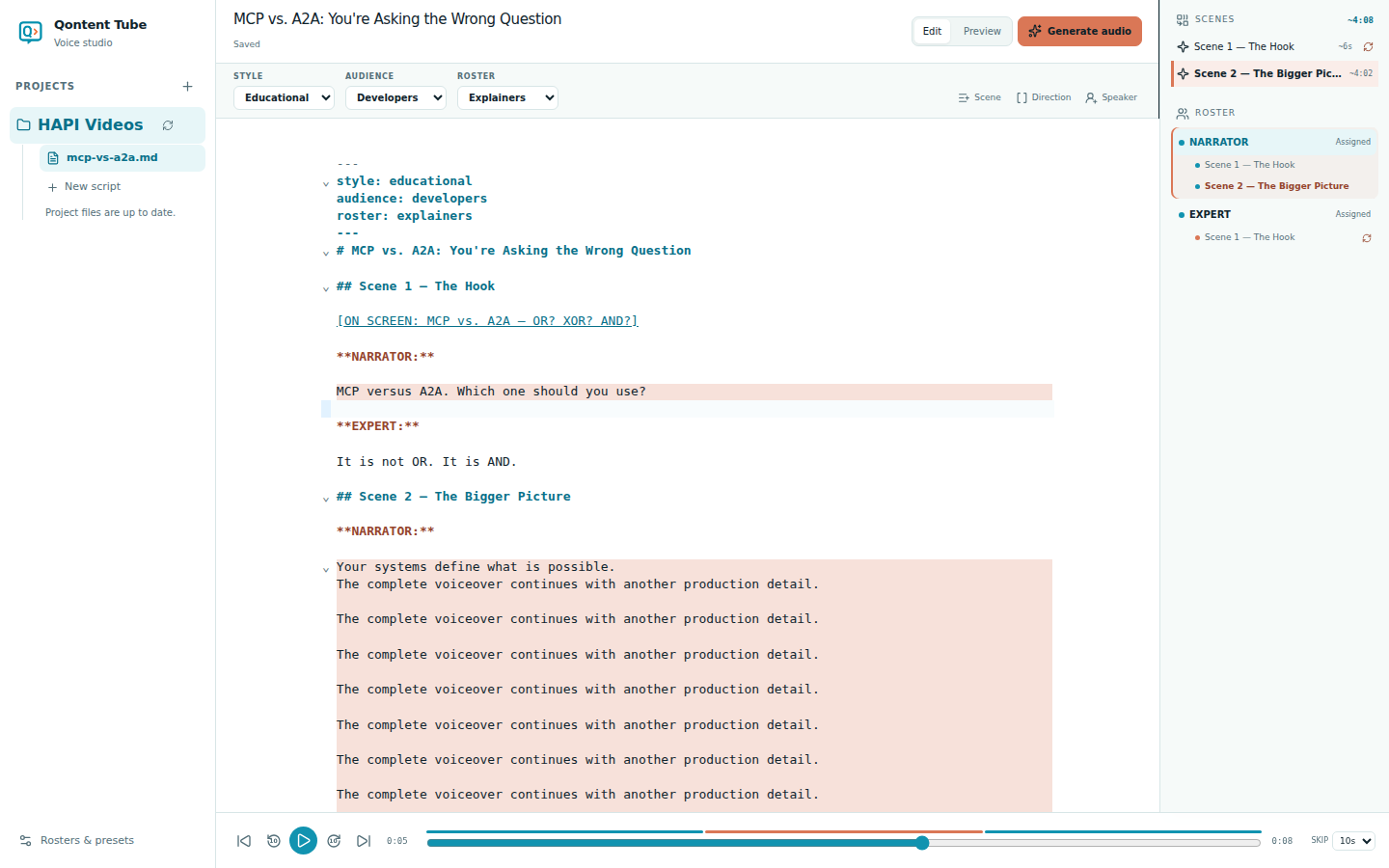
Qontent Tube uses a deliberately small Markdown grammar. It recognizes structure deterministically, so your source remains readable in any text editor and the same text always produces the same outline.
Complete example
---
style: educational
audience: developers
roster: explainers
---

# MCP vs. A2A: You Are Asking the Wrong Question

## Scene 1 — The hook

[ON SCREEN: MCP vs. A2A — OR? XOR? AND?]

**NARRATOR:**

MCP versus A2A. Which one should you use?

**EXPERT:**

It is not OR. It is AND.
The four structural rules
- The first level-one heading (
#) is the script title. - Every level-two heading (
##) begins a scene. - A standalone bold name ending in a colon, such as
**NARRATOR:**, begins that speaker's dialogue. - A standalone bracketed line, such as
[ON SCREEN: …], is a visible production direction and is never synthesized.[ANIM: …]lines describe animation intent; they appear on the timeline and guide AI drafting.-
[ON SCREEN: …]describes what should be visible: text, interface, diagram, image, or composition.
-
[ANIM: …]describes movement or timing: enter, reveal, highlight, transition, zoom, wave, and so on. Qontent Tube anchors it to the following dialogue and places it on the animation timeline.
-
Dialogue continues until the next speaker cue, scene heading, or standalone direction. Bold or italic emphasis inside a dialogue paragraph remains part of the spoken text.
Style, audience, and roster
The optional front matter at the beginning of the file records organizational choices. Since 0.2 it also accepts theme (a theme slug), formats (16:9, 9:16), and languages (the first is the script's own language). Translations add source, sourceRevision, and language, and AI drafts carry draft: true until you accept them. Selecting a Style or Audience updates its slug without rewriting dialogue or changing the voice-generation settings. The Roster determines how speaker cues resolve to voices.
Structural guidance
Qontent Tube keeps the document editable when it finds a problem. The outline calls attention to:
- Dialogue outside a scene
- A speaker name that does not match the active roster
- A script with no selected roster
- Missing or malformed scene structure
An unmatched speaker cannot be generated until the roster or script cue is corrected.
Navigate the source
Choose a scene in the outline to move to that scene. Choose a roster member to highlight every dialogue range for that speaker, then select an occurrence to jump to it. Playback highlighting is separate from manual selection and does not move your editing caret.