Themes
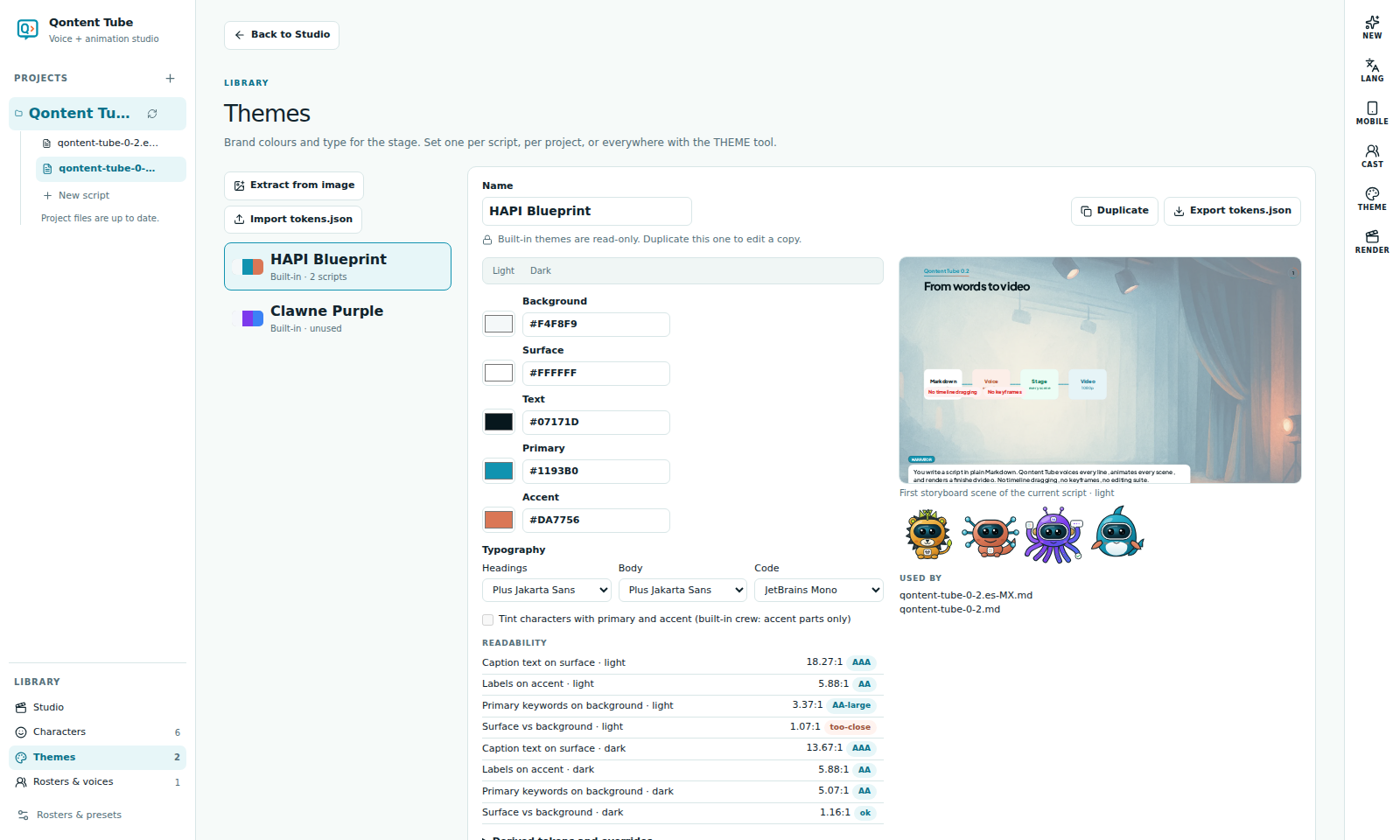
A theme gives the stage your brand: background, surface, text, primary, and accent colors for light and dark scenes, plus fonts. Qontent Tube derives every other stage color from those roles, so changing one color restyles everything consistently.
Create and edit
Library → Themes lists the built-in themes (read-only) and yours.
- Duplicate a built-in theme or create a new one.
- Edit the roles for light and dark scenes, the fonts, and, if you need, individual tokens.
- The live preview shows your current script's first scene and the crew in the theme.
- Extract from image proposes a palette from a logo or screenshot, entirely on your computer.
Readability
Each theme is graded against WCAG contrast for captions, labels on accent colors, and keywords. When a combination is too weak, Fix adjusts the color just enough to pass.
Where a theme applies
The THEME tool applies a theme to the script, the project, or everywhere, and shows which one is active. The most specific wins: script, then project, then the global default.
Optional character tinting lets the crew's accent parts take the theme's colors.
Import and export
Export a theme as tokens.json (Design Tokens format) or import one. Deleting a theme that is in use asks which theme replaces it.